Water System SOP
SCADA ALARMS:
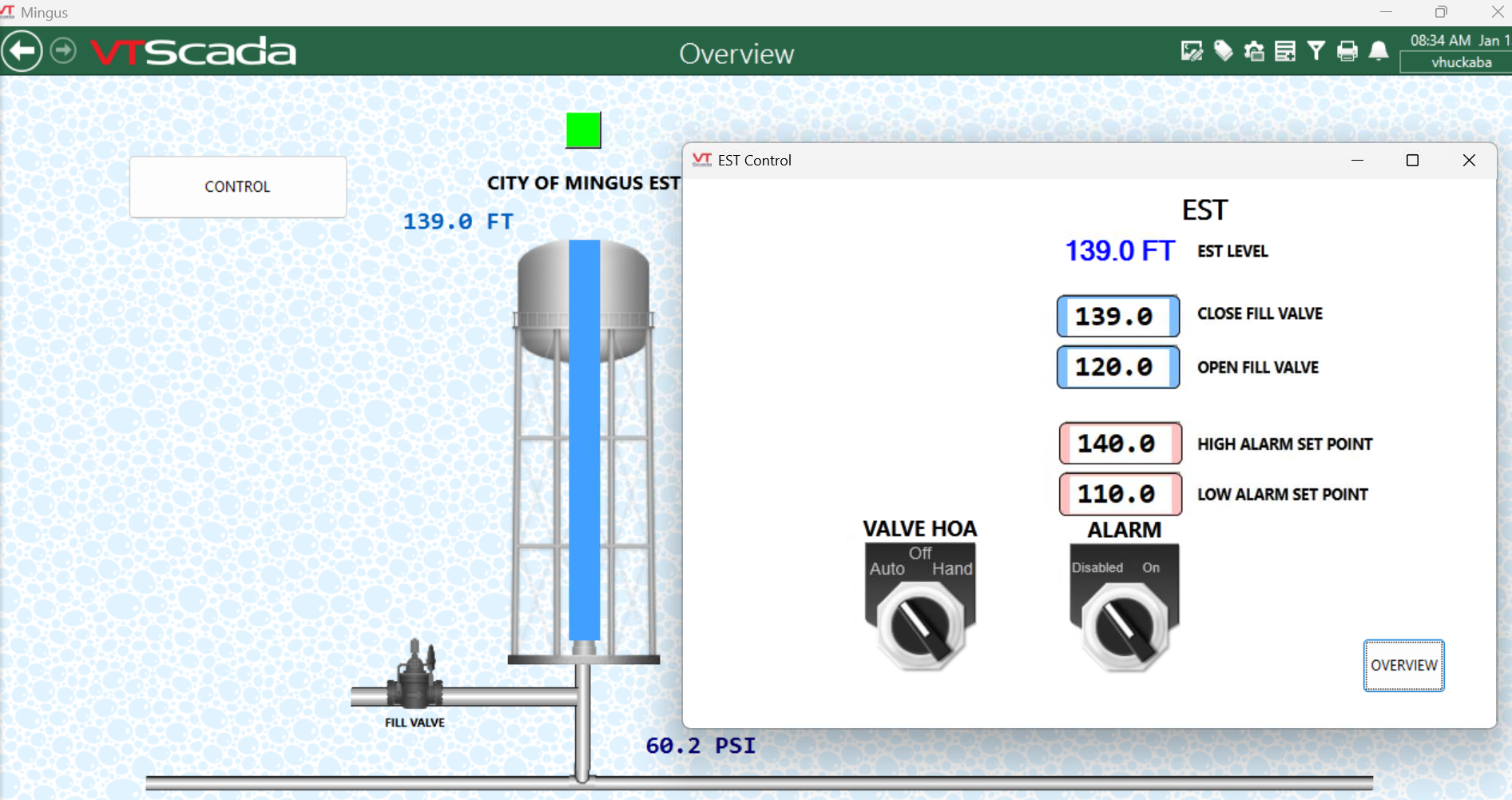
- Check SCADA: Login and check the graph for unusual patterns. Click the "CONTROL" box. (If there was a power outage it may have reset the levels. If incorrect, set correct levels and proceed to step 2.)
Figure A. Tower is Full at 60.2 PSI 139’
2. Acknowledge alarms by clicking the red flashing bell at the top right near the time. Once on the alarm screen click the three check marks above “Alarm Actions” to ack all alarms.
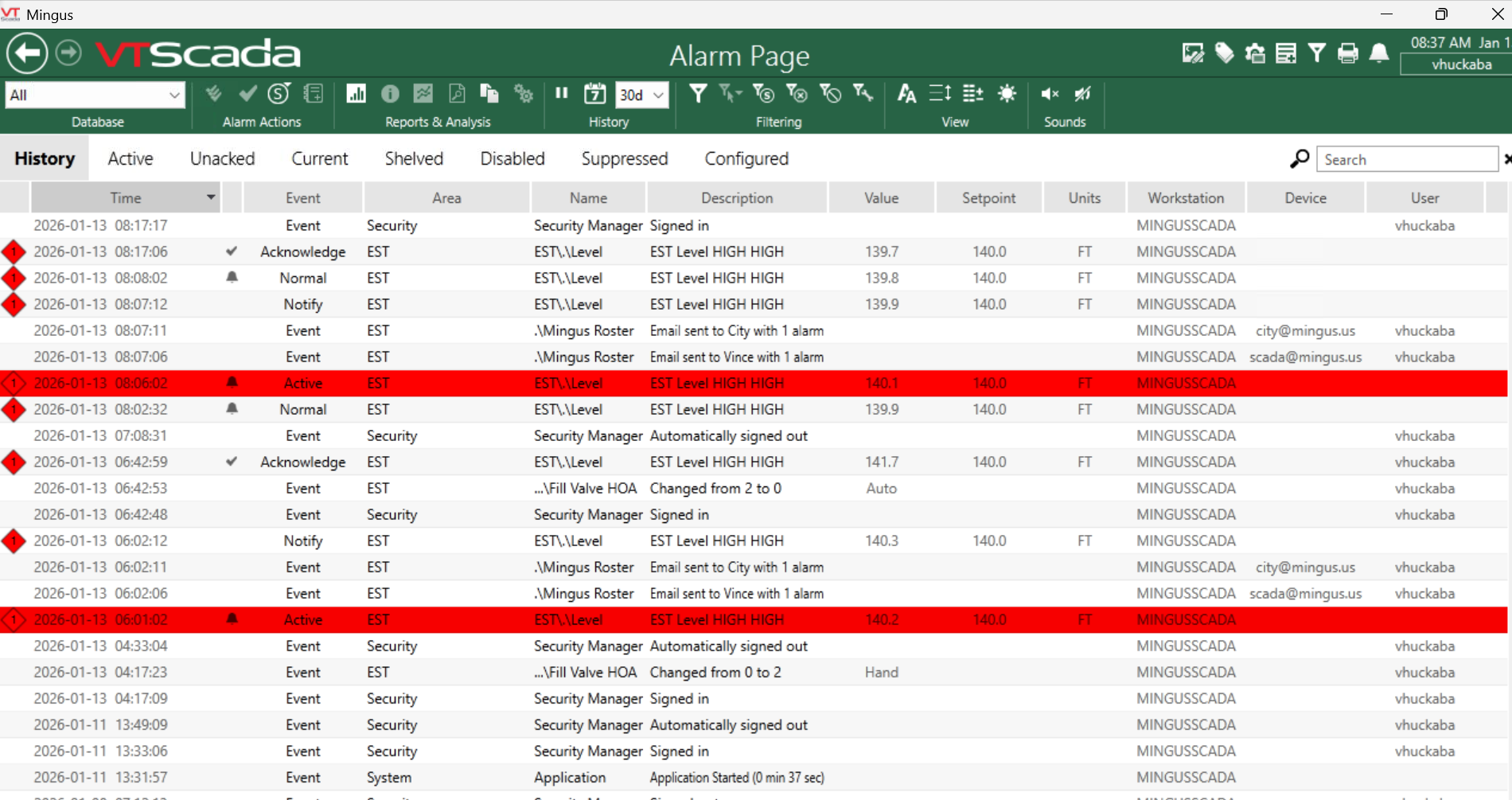
3. If the alarm was for high level, the tower is overflowing which means SCADA did not shut the valve off (fill valve is green) or the fill valve is stuck open (fill valve is gray but water is still flowing into the tower) and needs repairs or there is a SCADA problem. Contact the Mingus Water Super. (254) 672-5995 x3
4. If the alarm is for low level, and water is not getting into the tower.
Fill valve is green but no water is flowing into the tower.
At this point, change fill valve to “Hand” in SCADA to prevent contaminants from getting into the tower.
a. Login to SCADA and click the “CONTROL” box. Click Hand on the VALVE HA image and then click OK. See Fig A above.
b. Check pressure on the intake flush pipe at the tower, if it is below 65 PSI, water is not getting into the fill pipe at the top. It needs at minimum 62 PSI to flow into the tower.
c. Open the flush valve at the tower inlet all the way and if it is not projecting water to the cinder block, the pressure is low. Use a pressure meter to verify if available.
d. If pressure is normal, but not filling the tower, the fill valve needs repairs or there is a SCADA issue. Contact Water Super #3 above.
5. Low Pressure: Check the line from the tower to the Master Meter (MM), drive 108 toward the MM and look for water. Visibly check the MM to see if water is flowing thru it. If water is flowing thru it, we have a leak somewhere on our line. Shut the MM valve off and locate the leak. You may need to access Oak Hills Ranch as our line crosses it. Repair and proceed to step #7
6. If no leaks are visible and the meter is not showing a flow of water, call Strawn on call (254) 210-1440 and let them know we are not getting water and tell there isn’t enough pressure to fill our tower and that we have verified it is not on our side. If no answer, call Danny (254) 631-4525 or Owen (940) 654-0465.
7. Once pressure is back to normal, you will need to flush at the tower inlet until you have a good residual and clear water. Once you have 100% verified the water is clean and clear (You may need to get a BACT test if the water line was compromised or issue a BWN until a BACT sample can be verified.) Once verified clear of contaminates, activate the fill valve in SCADA by clicking "Auto" on the VALVE HOA image and then click OK. The tower should begin to fill.
Notes: Alarm is counter intuitive, Disabled means it will send alarms and that is where it should always be.